

Android terms of privacy

Android app permissions in terms of privacy

Before, Android users had no such choice. The operating system didn’t give you the option to choose which app permissions to grant to apps. However, now you have that option, and we sincerely recommend you taking advantage of it!

Table of Contents

How to manage Android app permissions?

1) When installing an app

When an app is placed in the Store, the developer sets all the required permissions. In Google Play, this information can be found in the block Description → About app → App permissions for the app → Other.

Google Play requires developers to:

A) to notify what data the app needs to share with third parties;

B) process them independently: specifying whether it’s a mandatory data and the purpose of processing.

2) In the course of the task

During runtime, the app may request additional runtime permission to access your personal data or action on the device. This category of application permissions is called “runtime” or “sensitive permissions”.

If they cannot be avoided, Android requires developers to ask for them additionally, even if they have been specified in the Store. These android permissions can be temporary (allow access to the camera only this time) and limited (approximate location).

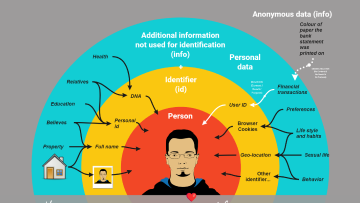
What is Personal Data? Closer look into GDRP Definition

Understand what you actually need to protect.

What permissions does Android app can use?

🔹 Calendar (read events and data, add/modify events, send messages to guests without alerting the owner).

🔹 Camera (ability to take photos and videos).

🔹 Photos and Videos (ability to read photos and videos from the gallery).

🔹 Location (exact or approximate location of the device in the background/active mode).

🔹 Microphone (ability to record audio).

🔹 Music & Audio (ability to read audio files from storage).

🔹 Files (accessing files that are not related to it without notifying you).

🔹 Contacts (view contacts: their names, phone numbers, emails and change them).

🔹 Phone (ability to make and receive calls).

🔹 Call logs (access to the list of incoming and outgoing calls, phone numbers, date, and time of calls).

🔹 SMS messages (ability to receive and send SMS messages, view and delete them).

🔹 Notifications (ability to send notifications).

🔹 Nearby devices (finding and connecting to devices via Bluetooth, determining the relative location of the device).

🔹 Physical Activity (ability to view step count, determine if you are walking, biking, or driving).

🔹 Wearable sensors (access to health information from pulse oximeters, fitness trackers).

Android terms of privacy

Here’s the problem: users give permission not to a specific action or data, but to the whole group of them at once. This is where the information gap arises, which companies are in a rush to take advantage of.

For an example one need not look far. Consider the great and mighty Google. Its app access the microphone to ensure that the voice assistant works. By default, it will work all the time and respond to “okay, Google.” But there’s a catch: the device needs to listen to you constantly to recognize the phrase.

It can also save a history of voice requests by default, and use speech synthesis. One awkward move, and your voice is used to train voice models or anonymous Google reports.

You can deny permissions in the settings. But sometimes you have to take away access to the entire group of permissions at once to stop unnecessary actions. And this may affect the work of the product. Not many people will go for such a thing … 🤔

— Is there any good news about app permissions on Android?
— Yes! Android now monitors how apps use the permissions you’ve granted them. If you don’t open a service for a few months, the permissions are revoked.

How to change app permissions and access on Android?

And now here is some homework for all Android phone users! 

    1.  Get into the “Security and Privacy” settings box.
    2.  Look at what permissions that are used (don’t forget the system permissions).

Remember: you have the right to deny what seems suspicious to you, and you can always change your mind later and regain that access.

Share this article with your family, friends and colleagues. Together let’s make privacy more accessible💙

Personal Data Protection Help and Support under GDPR and National Laws

We help establish systematic personal data protection practices through training and consulting services.

Consulting services on data privacy according to GDPR, ISO 27701 and other international standards.

EU Representative Services under GDPR is a pay-as-you-go service where representation is free during periods without data subject requests or communication with supervisory authorities. The service remains free if the company has not significantly altered its data processing practices since its onboarding process.

A fundamental course that covers all aspects of GDPR and teaches how to apply them in practice.

Privacy training programs for teams both in live online and e-learning formats with diverse level of depth. Customizable and interactive solution for fair price.

Materials on the topic

Personal information-1

What is Personal Data? Closer look into GDRP Definition

«Right to be forgotten» and freedom of speech: how to strike a balance on the Internet

What’s new about privacy at Apple?

Reach Data Privacy & AI Compliance

Fill in the form and get a free consultation.

A full guide on General Data Protection Regulation or GDPR for short. Here you’ll learn what is personal data, what are the rights of subjects, how to comply with the regulation.

Contact Sales

Learn what Data Privacy Office Europe can do for you.

Fill out the form and we will contact you as soon as possible!